Move to Shopify without losing your Google rankings
A migration is the riskiest time for a store’s SEO. I map every URL that has rankings or links, redirect each one correctly, and monitor Search Console until traffic is back to where it was.
Signs you need migration to Shopify (seo-safe)
What you get
From $600. Scoped on a call, fixed in writing before work starts.
01URL inventory
Every URL with traffic, rankings or backlinks, pulled from Search Console, analytics, crawls and backlink data.
02Redirect map
One-to-one 301 mapping to the most relevant new URL. No blanket redirects to the homepage.
03Data migration
Products, variants, customers, orders, reviews and blog posts, with meta titles and descriptions carried over.
04Content parity
The new templates keep the copy, headings and internal links that earned your rankings.
05Launch-day QA
A redirect test, crawl comparison, sitemap submission and Search Console checks.
068-week monitoring
Weekly checks for 404s, index coverage and rankings, with fixes applied as soon as anything appears.
How I approach Migration to Shopify
Written by Saqib Ali, Shopify SEO lead & developer at Globe Skillz. Updated November 2026.

Saqib Ali
Shopify SEO & development since 2019. 180+ projects across 42 countries.
Why migrations lose traffic
Shopify uses fixed URL patterns: /products/, /collections/, /pages/ and /blogs/news/. Your old platform almost certainly used different ones. Every ranked URL that isn’t redirected to its closest equivalent loses its rankings and the value of its backlinks.
The migration sequence
- Benchmark: record rankings, traffic and top pages before anything changes
- Inventory and redirect map, approved by you
- Build and migrate on a development store
- Pre-launch crawl of the development store against the old site
- Launch, then redirect upload and immediate verification
- Eight weeks of monitoring and fixes
I’ve worked with WooCommerce stores, including Albarik, a 6-department megastore in Pakistan, so I know both platforms well.
Results from a real client
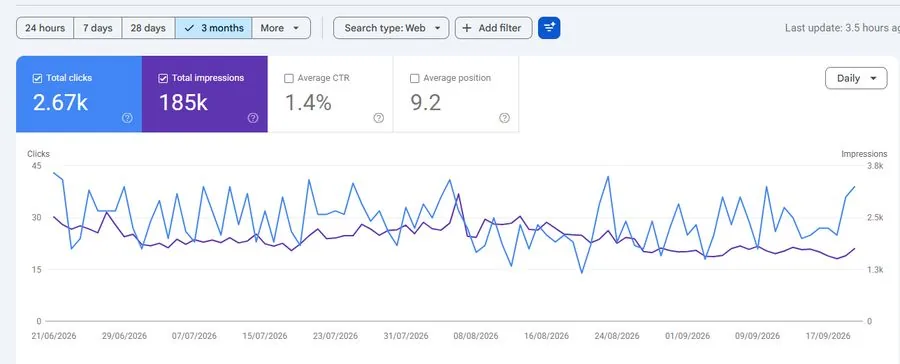
Albarik — megastore (Pakistan)
Multi-department retailer serving Pakistan. Average position 9.2.
- Clicks
- 2.67K
- Impr.
- 185K
- CTR
- 1.4%
- Pos.
- 9.2
Will I lose SEO rankings moving to Shopify?
A short dip in the first 2–4 weeks is normal while Google processes the redirects. With a complete redirect map and matching content, most stores recover within 4–8 weeks and often improve after that, because Shopify is faster.
Can I keep my URLs exactly the same?
Not entirely, because Shopify’s URL prefixes are fixed. Product handles can usually stay the same, so the only change is the prefix, which keeps redirects clean.
Do you migrate customers and orders?
Yes. Customers, order history, products, reviews and blog content can all be moved. Customer passwords can’t be transferred, so I set up an account-activation email.
Can you redesign during the migration?
Yes, and it’s often the most efficient approach. The SEO checks stay the same, and content parity on key pages becomes even more important.
Often paired with
Want to know what’s holding your store back?
Send me your store URL. I’ll record a short review of the biggest SEO and technical issues I can find — free, and yours to keep whether we work together or not.